Beschreibung
Unlock your Mac with just your fingerprint, passcode, or watch – without even unlocking your iOS device.
––––––––––––––––––––––––––
Requires a Mac with Bluetooth LE (Low Energy) running macOS Yosemite or newer, and an iOS device with Bluetooth LE running iOS 8 or newer.
Please make sure your devices support Bluetooth LE before purchasing MacID for iOS.
––––––––––––––––––––––––––
FEATURES
• Works with multiple Macs, iOS devices and Apple Watches at once.
• Unlock your Mac using Touch ID, Passcode, Apple Watch or Pebble.
• Apple Watch Complication & background refresh for super quick access.
• Interactive notifications – you don't even have to unlock your iOS device.
• Control your Mac's audio – works with iTunes & Spotify!
• Manually lock your Mac or start the screensaver remotely.
• Auto-lock when your iOS device moves away from your Mac.
• Proximity Wake & automatic unlocking when returning to your Mac.
• 3D Touch shortcuts.
• Notification Center widget – unlock your Mac from anywhere on your iOS device.
• Share clipboard text to and from your Mac.
• Choose from beautiful colour schemes.
• Use MacID to authorise tasks that require your macOS admin password. (Admin accounts only)
• MacID for macOS never connects to the Internet without your consent.
• Your macOS password is never broadcast and never leaves your Mac.
• Incredibly simple to use but packed full of features and options.
• Automatically throttles connections during Low Power Mode to save even more battery.
INTERACTIVE NOTIFICATIONS
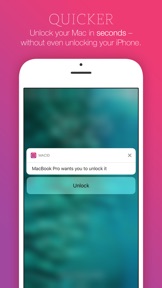
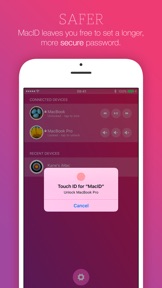
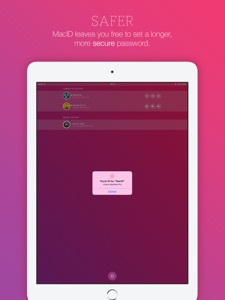
You don't even need to open the app to unlock your Mac. MacID intelligently notifies you when one of your connected Macs is woken up, which you can action directly from your iOS lock screen using either your fingerprint or passcode.
AUTHORISE
MacID can notify you when tasks require your macOS admin password, like moving protected files to Trash or changing a setting in System Preferences. (Admin accounts only)
AUDIO CONTROLS
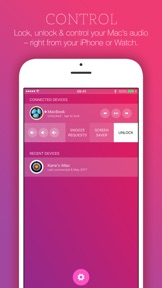
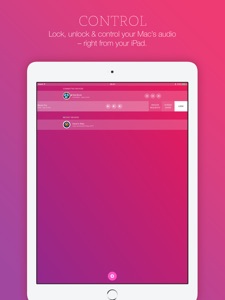
You can also play, pause and skip iTunes & Spotify on your Mac remotely, as well as change the volume. Simply long-press on the audio controls to toggle between track and volume controls. Audio controls work anywhere the physical keys would on your Mac.
3D TOUCH
Press hard on the app icon to quickly access settings or to lock and unlock your Mac.
URL SCHEMES:
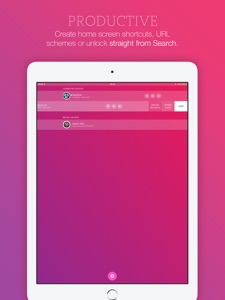
Create Home Screen shortcuts and URL schemes to lock and unlock your Mac from other apps.
CLIPBOARD SHARING
Ever needed to quickly share a phone number or piece of text between your Mac and iOS device? Clipboard sharing is built right into MacID – share any piece of text quickly and reliably. And now you can do it right from the Notification Center.
AUTO-LOCK
Enable auto-lock in MacID for macOS and your Mac will automatically lock when your iOS device moves away from it. You can even get notified when your Mac locks itself.
PROXIMITY WAKE
Enable Proximity Wake in MacID for macOS and your Mac will wake its display when your iOS device gets near. Simply authorise from the interactive notification MacID sends you to unlock your Mac, or enable automatic unlocking to have MacID do it for you.
WIDGET
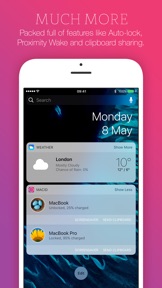
MacID includes a handy Notification Center widget, which will show all your currently connected Macs and give you quick access to lock and unlock them from anywhere on your iOS device. You can even start a Mac's screensaver or share the clipboard.
––––––––––––––––––––––––––
Macs that support Bluetooth LE:
• MacBook Air 2011+
• MacBook Pro 2012+
• iMac 2012+
• Mac Mini 2011+
• Mac Pro 2013+
Check if your Mac supports Bluetooth Low Energy: click the Apple menu > About This Mac > System Report > Bluetooth.
MacID for iOS needs to be paired with the free MacID for macOS companion app, which you must download from: macid.co/get
––––––––––––––––––––––––––
Featured as EE's "App of the Week" in the UK
One of Time Magazine's "5 Apps Not To Miss" and "7 Best Apple Watch Apps"
Featured in 100s of articles across the globe!
––––––––––––––––––––––––––
Neue Funktionen von Version 1.3.6
HELLO! Long time no speak. How are you? I hope you've been well. I must apologise for my prolonged absence; the last half of 2016 absolutely ran away from me but I've caught up and I'M BACK! :D
So what's new in MacID v.1.3.6?
- Are you running iOS 10.3 or newer? Then you can take advantage of new APIs in iOS that allow us to change the app icon on your home screen. That's right! When you change your colour scheme in MacID for iOS, you can have the icon change too!
- The MacID widget has had a beautiful redesign to make use of the expand/collapse functionality in iOS 10. The "show more" button will now only show if there's more than 1 device connected. And like before, you can choose to hide the widget if no devices are connected. I'm afraid there's no decent way for widgets to speak to the main app still, so for now the widget will still have to open the main app.
- The MacID widget and MacID for watchOS now show the current charge levels for MacBooks. MacID for macOS hooks into times that it already communicates with MacID for iOS, so there is no extra power used for this. The compromise is that the battery charge will not be continually up to date, so use it more of an advisory!
Don't forget to update MacID for macOS! Here's what's new there:
- MacID for macOS now remembers between launches if you asked a Mac to disconnect. Handy for those (often) times that Bluetooth needs resetting.
- Tap to Unlock tap pattern no longer gets forgotten if you have to forget and re-add your primary device. You still need to have a device paired to actually use Tap to Unlock, though.
- You can now stop MacID from disabling auto-lock when apps keep your screen awake. Use this with caution because auto-lock may trigger while you're watching a movie!
- Ensures that MacID AppleScript extensions get run in alphabetical order. To find out more about MacID for macOS AppleScript extensions, search for "extension" on the MacID blog.
As always, if you have a moment spare, please update your rating and review in the App Store. Every time a developer updates an app, the rating gets removed from search results. Independent developers like myself rely on these ratings, so if you have the time it is seriously appreciated. Thanks!
If you're experiencing regular time-outs with Bluetooth connections since updating to Sierra, you're not alone. With some persistence and restarting, most of these issues can be resolved eventually! Check out the MacID help page for more information.
Lots of <3,
Kane.