Wird aktualisiert


iPhone Screenshots



iPad Screenshots


Beschreibung
"PockeTraveL" is smartphones/tablets App that records the route and photos of your travel and share them with friends.
Have you thought you want to record route and discovery during your travel?
And Have you thought you want to share them with your friends?
You will be able to record route and photo during your travel by using "PockeTraveL".
And you will be able to share them with your friend by using Travel Log Post Service called "旅行記掲示板http://travelboard.sakura.ne.jp".
Even if your friends do not use "PockeTraveL", You can share your travel log through the SNS, such as facebook and twitter.
You can record travel of a variety.
For example Walking, Trekking, Cycling by Bicycle, Touring by Motorcycle, Drive by Car, Train journey and Voyage.
■ App features
1. Record of travel
Record route of travel by GPS
Record photo location by GPS
2. List of your Travel Log
Display the shooting point of photo and the moving path of the journey on the map.
Display description of travel photos.
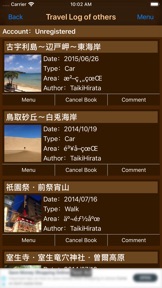
3. List of other's Travel Log
Display others shooting point of photo and others moving path of the journey on the map.
Display description of others travel photos.
4. Share your Travel Log
Share your photo and your moving path of the journey.
Share your Travel Log through SNS such as Facebook, twitter and more.
■How to create Travel Log
1. Start Recording Travel.
・If you want to start recording Travel Log, make sure that the settings of the location information is enabled on the device, please push "Start" button under the sky.
・If you succeed to get location information, the state label will change to "Recording" and recording will be started. If you failed to get location information. Make sure that the settings of the location information is enabled on the device, please run again under the sky.
・During the recording, state label becomes "Recording", "Start" button becomes "Pause" button.
2. Take Pictures During Travel
・If you want to take pictures during travel, touch "Photo" button.
・If picture taking was succeed, the input screen of the title and description of the photos will be displayed and you can enter a description and title of the photo on this screen. If you want to save the data, touch "Save" button.
*Be careful if you do not press the "Save" button, the photo will not be saved."
・If saving the photo was succeed, pin of the photo location will be displayed on the map.
3. Finish Recording And Save Travel Log
・If you want to finish and save Travel Log, touch "Finish" button.
・If you touch "Finish" button, Travel Log Edit screen will be shown. Enter items and touch "Save" button in this screen.
Please refer to the manual for more information on how to use it.
■Manual Page
http://travelboard.sakura.ne.jp/poketra_en_ios_manual.html
*More battery power will be needed during recording in order to acquire location information in background by GPS.
Neue Funktionen von Version 2.6
・Supported iOS16.
Anbieter
Name
TAIKI HIRATA
Informationen
Entwickler
Kategorien
Version
2.6
Größe
12,1 MB
Game Center
Nein
VPP Device Licensing
Ja
Bewertung
Altersfreigabe: 4+
Kompatibilität
iOS 15.0 oder neuer
Geräte
iPhone 5s, iPhone 6, iPhone 6 Plus, iPhone 6s, iPhone 6s Plus, iPhone SE, iPhone 7, iPhone 7 Plus, iPhone 8, iPhone 8 Plus, iPhone X, iPhone XR, iPhone XS, iPhone XS Max, iPhone 11, iPhone 11 Pro, iPhone 11 Pro Max, iPhone SE (2. Generation), iPhone 12, iPhone 12 Pro, iPhone 12 Pro Max, iPhone 12 mini, iPhone 13, iPhone 13 Pro, iPhone 13 Pro Max, iPhone 13 mini, iPhone SE (3. Generation), iPhone 14, iPhone 14 Plus, iPhone 14 Pro, iPhone 14 Pro Max, iPhone 15, iPhone 15 Plus, iPhone 15 Pro, iPhone 15 Pro Max, iPhone 16, iPhone 16Plus, iPhone 16Pro, iPhone 16ProMax, iPad (5. Generation) Wi-Fi, iPad (5. Generation) Wi-Fi + Cellular, iPad (6. Generation) Wi-Fi, iPad (6. Generation) Wi-Fi + Cellular, iPad Pro, iPad Pro (Cellular), iPad Pro (9,7 Zoll), iPad Pro (9,7 Zoll) (Cellular), iPad Pro (12,9", 2. Generation), iPad Pro (12,9", 2. Generation) Wi-Fi + Cellular, iPad Pro (10,5"), iPad Pro (10,5") Wi-Fi + Cellular, iPad Pro (11"), iPad Pro (11") Wi-Fi + Cellular, iPad Pro (12,9", 3. Generation), iPad Pro (12,9", 3. Generation) Wi-Fi + Cellular, iPad Air, iPad Air (Cellular), iPad Air 2, iPad Air 2 (Cellular), iPad Air (3. Generation), iPad Air (3. Generation) Wi-Fi + Cellular, iPad mini Retina, iPad mini Retina (Cellular), iPad mini 3, iPad mini 3 (Cellular), iPad mini 4, iPad mini 4 (Cellular), iPad mini (5. Generation), iPad mini (5. Generation) Wi-Fi + Cellular, iPad (7. Generation) Wi-Fi + Cellular, iPad Pro 11" (2. Generation), iPad Pro 11" (2. Generation) Wi-Fi + Cellular, iPad Pro 12,9" (4. Generation), iPad Pro 12,9" (4. Generation) Wi-Fi + Cellular, iPad Air (4. Generation) (Wi-Fi), iPad Air (4. Generation) (Wi-Fi + Cellular), iPad (8. Generation) Wi-Fi, iPad (8. Generation) Wi-Fi + Cellular, iPad Pro 11" (3. Generation), iPad Pro 11" (3. Generation) Wi-Fi + Cellular, iPad Pro 12,9" (5. Generation), iPad Pro 12,9" (5. Generation) Wi-Fi + Cellular, iPad (9. Generation), iPad (9. Generation) Wi-Fi + Cellular, iPad mini (6. Generation), iPad mini (6. Generation) Wi-Fi + Cellular, iPad Air (5. Generation), iPad Air (5. Generation) Wi-Fi + Cellular, iPad Pro 11" (4. Generation), iPad Pro 11" (4. Generation) Wi-Fi + Cellular, iPad Pro (12,9", 6. Generation), iPad Pro (12,9", 6. Generation) Wi-Fi + Cellular, iPad (10. Generation), iPad (10. Generation) Wi-Fi + Cellular, iPad Air (11″, M2, Wi-Fi), iPad Air (13″, M2, Wi-Fi), iPad Air (13″, M2, Wi-Fi + Cellular), iPad Pro (11″, M4, Wi-Fi), iPad Pro (11″, M4, Wi-Fi + Cellular), iPad Pro (13″, M4, Wi-Fi), iPad Pro (13″, M4, Wi-Fi + Cellular), iPad MiniA17Pro, iPad MiniA17ProCellular, iPod touch (6. Generation), iPod touch (7. Generation)
Sprachen
Englisch, Japanisch
App Store: Kundenbewertungen
Bewertungen & Rezensionen
0,0 von 5 (Keine Bewertung)
App Store: Kundenrezensionen
Kein Eintrag