Wird aktualisiert



iPhone Screenshots

iPad Screenshots
Beschreibung
모바일에 최적화된 네이버앱으로 매일 다양하고 유용한 정보를 만나보세요.
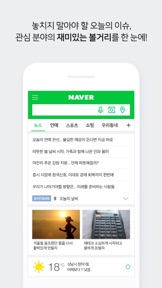
1) 메인을 내 마음대로!
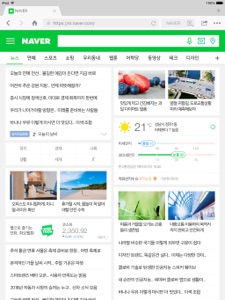
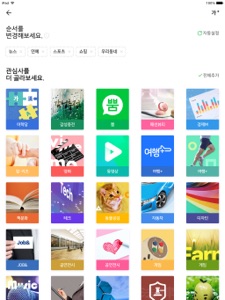
메인 메뉴탭 끝의 + 아이콘을 눌러보세요. 마음에 드는 콘텐츠를 추가하거나 보고 싶은 순서대로 정렬할 수 있어요.
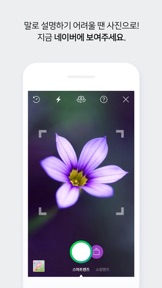
2) 이미지로 검색하는 스마트렌즈, 쇼핑렌즈
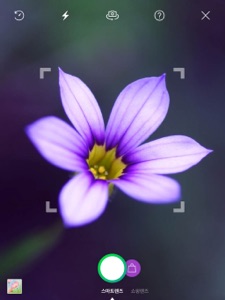
말로 설명하기 어려울 땐 검색창에서 카메라 아이콘을 눌러 이미지로 검색해보세요. 이미지를 인식해 사물, QR코드, 장소, 쇼핑 아이템을 찾아드려요.
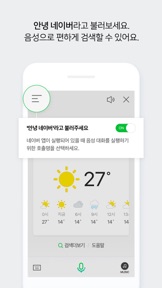
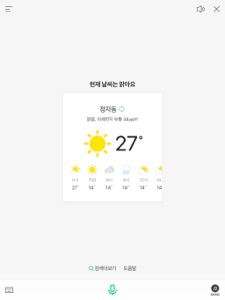
3) 소리로 검색하는 음성검색
검색창에서 마이크 아이콘을 눌러 궁금한 것을 물어보세요. 음성을 인식하여 필요한 정보를 알려드려요. 음악 검색도 가능합니다!
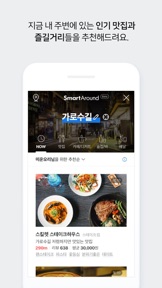
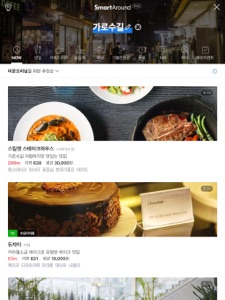
4) 맛있고 즐거운 발견! 스마트 어라운드
클릭 한번으로 현재 위치와 시간에 딱 맞는 맛집, 카페, 놀거리 등을 추천 받을 수 있습니다. 검색창의 위치 아이콘을 눌러 보세요.
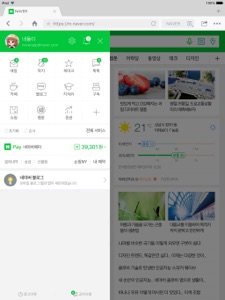
5) 자주 가는 서비스를 한 곳에서
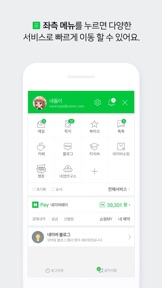
삼선 메뉴(三)를 통해 내 소식을 빠르게 확인하고 자주 가는 서비스를 한 곳에서 편하게 이용할 수 있습니다.
6) 미리 경험하고 함께 만드는 네앱연구소
삼선 메뉴(三)와 앱 설정 메뉴를 통해 네앱연구소에 입장해보세요. 다양한 프로젝트를 볼 수 있고 관심있는 기능을 사용해 볼 수 있습니다. 또 좋은 아이디어가 있다면 언제든지 제안할 수 있습니다.
※ 필수 접근권한 상세
- 위치 서비스 : 현재 위치를 중심으로 지도 및 날씨 정보를 이용할 수 있습니다.
- 카메라 : 사진 첨부를 위해 촬영하거나 코드 검색 기능을 이용할 수 있습니다.
- 사진 : 서비스 이용과정에서 기기에 이미지 등의 파일을 업로드/다운로드 하는 기능을 이용할 수 있습니다.
- 마이크 : 음성 및 음악 검색 기능을 이용할 수 있습니다.
- 연락처 : 네이버 페이 송금시 주소록 정보 불러오기 기능을 이용할 수 있습니다
※ 참고 사항
네이버앱을 쾌적하게 이용하기 위해서는, iOS 9.0 이상의 환경에서 설치해주실 것을 권장 드립니다.
앱 사용 중 문제가 발생한 경우, 네이버앱 설정 - 고객센터로 접속하여 궁금한 점을 문의해주세요.
A variety of useful information available at a single glance in the palm of your hands!
Check out NAVER App, improved to make your life easier.
1) Customize your NAVER App home screen!
Press a plus icon of the home screen to select the subjects you want to see in the main page or to rearrange the display order. In settings, you can add the subjects you like and you can rearrange the order by moving up and down.
2) Search with image, Smart Lens & Shopping Lens
When it’s hard to explain with words, press a camera icon in the search bar. It will identify the image and find the subject, QR code, or shopping items for you.
3) Search with sound, Voice Search
Press a mic icon on the search bar and ask what you are curious about. It will recognize your voice and find the information you need. You can also search for music!
4) Search based on location, Smart Around
Press a location icon on the search bar. It will recommend the best place to go based on your current location and time.
5) Frequently used services in one place!
You can quickly check your news and move to the frequently used services in one place through three-line menu. Set as favorites your frequently visited services such as Book, Grafolio, Shopping, among many others!
6) Experience and create together at NAVapp Lab
Enter NAVapp Lab through three-line menu and app settings menu. You can check out various projects and test out the functions of your interest. You can also propose your ideas of new functions or of those you've tested whenever you want.
※ NOTE
Please install iOS 9.0 or above for a pleasant experience using NAVER app.
Send your inquiries on NAVER App’s “Settings – Customer Center” if you encounter any problems while using NAVER App.
Neue Funktionen von Version 8.8.6
- iOS12 관련 사용성 개선
- 로그인 개선
- 기타 안정성 개선
Anbieter
Name
NAVER Corp.
Informationen
Entwickler
Kategorien
Version
8.8.6
Größe
163,7 MB
Game Center
Nein
VPP Device Licensing
Ja
Bewertung
Altersfreigabe: 4+
Kompatibilität
iOS 9.0 oder neuer
Geräte
iPhone 11 Pro Max, iPad Air 2 (Cellular), iPad mini Retina (Cellular), iPad Pro (11"), iPad (5. Generation) Wi-Fi, iPad (6. Generation) Wi-Fi, iPod touch (6. Generation), iPad Pro (11") Wi-Fi + Cellular, iPad (6. Generation) Wi-Fi + Cellular, iPad Pro (12,9", 3. Generation), iPad (5. Generation) Wi-Fi + Cellular, iPad mini (5. Generation) Wi-Fi + Cellular, iPad mini (5. Generation), iPad Pro, iPad mini 3, iPad mini 4 (Cellular), iPad mini 4, iPhone 11, iPod touch (7. Generation), iPad mini 3 (Cellular), iPad Air, iPad Air 2, iPad Pro (12,9", 2. Generation), iPad Pro (Cellular), iPad Pro (9,7 Zoll) (Cellular), iPad Pro (10,5") Wi-Fi + Cellular, iPad Pro (9,7 Zoll), iPad mini Retina, iPad Air (Cellular), iPad Air (3. Generation) Wi-Fi + Cellular, iPhone 6 Plus, iPad Air (3. Generation), iPad Pro (10,5"), iPad Pro (12,9", 2. Generation) Wi-Fi + Cellular, iPhone 6, iPhone XR, iPhone XS, iPhone 6s, iPhone SE, iPhone 7 Plus, iPhone 6s Plus, iPhone 5s, iPhone X, iPhone 8, iPhone XS Max, iPhone 8 Plus, iPhone 7, iPhone 5, iPad (7. Generation) Wi-Fi, iPhone 5c, iPad (7. Generation) Wi-Fi + Cellular, iPhone 11 Pro, iPad Pro (12,9", 3. Generation) Wi-Fi + Cellular
Sprachen
Englisch, Koreanisch
App Store: Kundenbewertungen
Bewertungen & Rezensionen
0,0 von 5 (Keine Bewertung)
App Store: Kundenrezensionen
Kein Eintrag