InfoBedingungenDatenschutzKontakt
 
Wird aktualisiert
ShutterSnitch

ShutterSnitch

Veröffentlicht: 2010-04-02
© 2010-2018 2ndNature
ShutterSnitch - QR Code
Version 4.3.7
4+
Laden im App Store
Version 4.3.7
4+
Laden im App Store
Veröffentlicht: 2010-04-02
© 2010-2018 2ndNature

iPhone Screenshots

Screenshot
Screenshot
Screenshot
Screenshot
Screenshot

Beschreibung

ShutterSnitch is subscription based.
For $2.99 a month you get access to all features and updates. The first week is *free* so you can verify that things work with your specific camera or wi-fi card.
Subscription payments are charged through your iTunes Account at confirmation of purchase and are auto-renewed. Renewal can be turned off 24 hours before the end of the current period in your Account Settings in the App Store. Privacy Policy: https://2ndnaturesoftware.com/privacypolicy
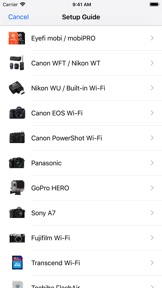
Wirelessly transfer images to your iPad from your Eye-Fi, Transcend Wi-Fi, Toshiba FlashAir, PQI Air, or ez Share card, GoPro HERO, Fujifilm cameras with built-in Wi-Fi, PTP/IP enabled device (such as the Nikon WU / D750 / Z7 or Canon EOS 5D Mark IV / 6D / 70D / M3 / EOS R) or a Canon, Nikon or other filetransmitter that supports uploading to an FTP server over your wireless network.
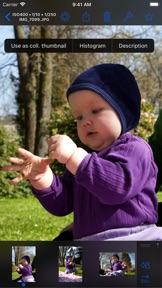
When a JPEG arrives, ShutterSnitch analyzes shutter speed, aperture, ISO, focal length, and light level and warns you if anything differs from the rules you've set up.
You now have a large preview screen that you can browse, pinch, zoom, and evaluate seconds after snapping your picture.
In a studio environment it's now easy to share shoots with crew and models. More fun and less juggling cards, adapters, and cables!
Please note: A large part of the magic of the wireless delivery lies in the setup of the devices outside of the ShutterSnitch app. For older FTP systems, be prepared to spend more than just a couple of minutes on this initial setup.
Features:
• Works with iPad, iPhone, and iPod touch devices running iOS 9 or higher.
• Full Retina & Retina HD display support.
• Crop, straighten, and adjust colors (temperature & tint, exposure, contrast, highlights, shadows, whites, blacks, clarity, vibrance, and saturation). All edits are non-destructive, so you can always fine-tune or revert to the original photo.
• Advanced metadata editing.
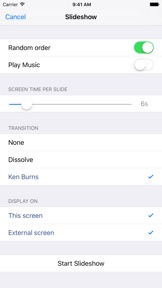
• Slideshow function with Ken Burns effect.
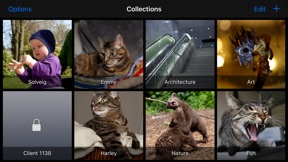
• Arrange your shoots in albums.
• Lock private albums.
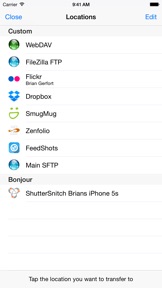
• Resize and/or watermark photos before sharing them via e-mail, Dropbox, Flickr, FTP, Google Drive, SmugMug, WebDAV, or Zenfolio.
• Large scale histograms (RGB,R,G,B).
• Visible and/or audible warnings.
• Map integration. Geo-tag JPEG photos automatically or manually.
• Highlight warnings.
• Add a caption and byline to the photos by tapping and holding the currently displayed full image.
• Custom username, password, and port for the built-in FTP and WebDAV servers.
• Receive files directly from one or more Eye-Fi cards.
• Receive photos from your GoPro HERO, Transcend Wi-Fi, Toshiba FlashAir, PQI Air, or ez Share card/adapter as you shoot them or import files from the card manually. *Note for GoPro cameras in burst or time-laps mode*: Photos can only be retrieved once the camera exits the mode.
• Supports receiving and importing photos via PTP/IP. For example from Nikon WU transmitters, D750 / D850 / Z7 and Canon EOS 5D Mark IV / 6D / 70D / M3 / EOS R.
• Supports receiving photos from Panasonic cameras that work with their LUMIX LINK app such as the GH3 and GH4. (Not the "Image App", so DMC-G7 is not supported.)
• Supports Sony A7 and NEX cameras.
• Supports Fujifilm cameras with built-in Wi-Fi such as X100T, X-M1, and X-T2.
• Supports Canon PowerShot G16 and other Canon cameras that work with their CameraWindow app.
• AirDrop export.
• Bonjour support for easy discovery in your Bonjour enabled applications. This also works the other way - when you want to export images to an FTP server, this is automatically detected (if the server is Bonjour enabled). This makes it incredibly easy to transfer images between your iPad and you iPhone for example.
ShutterSnitch can also be used as a regular image browser if you simply transfer the pictures from your computer through an FTP client.
Please note that continued use of GPS running in the background can dramatically decrease battery life.

Neue Funktionen von Version 4.3.7

• Cleaned up the listening info bar. It now shows the name of the network you're connected to instead of the FTP port and whether Eye-Fi is enabled. (Don't worry, all services are running as they always do.)
• Minor fixes.

Anbieter

Name

Brian Gerfort

Informationen

Entwickler

Kategorien

Version

4.3.7

Größe

23,1 MB

Game Center

Nein

VPP Device Licensing

Ja

Bewertung

Altersfreigabe: 4+

Kompatibilität

iOS 9.0 oder neuer

Geräte

iPhone 11 Pro Max, iPad Air 2 (Cellular), iPad mini Retina (Cellular), iPad Pro (11"), iPad (5. Generation) Wi-Fi, iPad (6. Generation) Wi-Fi, iPod touch (6. Generation), iPad Pro (11") Wi-Fi + Cellular, iPad (6. Generation) Wi-Fi + Cellular, iPad Pro (12,9", 3. Generation), iPad (5. Generation) Wi-Fi + Cellular, iPad mini (5. Generation) Wi-Fi + Cellular, iPad mini (5. Generation), iPad Pro, iPad mini 3, iPad mini 4 (Cellular), iPad mini 4, iPhone 11, iPod touch (7. Generation), iPad mini 3 (Cellular), iPad Air, iPad Air 2, iPad Pro (12,9", 2. Generation), iPad Pro (Cellular), iPad Pro (9,7 Zoll) (Cellular), iPad Pro (10,5") Wi-Fi + Cellular, iPad Pro (9,7 Zoll), iPad mini Retina, iPad Air (Cellular), iPad Air (3. Generation) Wi-Fi + Cellular, iPhone 6 Plus, iPad Air (3. Generation), iPad Pro (10,5"), iPad Pro (12,9", 2. Generation) Wi-Fi + Cellular, iPhone 6, iPhone XR, iPhone XS, iPhone 6s, iPhone SE, iPhone 7 Plus, iPhone 6s Plus, iPhone 5s, iPhone X, iPhone 8, iPhone XS Max, iPhone 8 Plus, iPhone 7, iPhone 5, iPad (7. Generation) Wi-Fi, iPhone 5c, iPad (7. Generation) Wi-Fi + Cellular, iPhone 11 Pro, iPad Pro (12,9", 3. Generation) Wi-Fi + Cellular

Sprachen

Deutsch, Dänisch, Englisch, Japanisch

App Store: Kundenbewertungen

Bewertungen & Rezensionen

4,5 von 5 (9 Bewertungen)

App Store: Kundenrezensionen

2017-04-21

???

I've been installing and re-installing this app several times and still don't see the real value of it. File transfer from my Fuji X Cam works fine in all different ways but as soon as you apply metadata (copyright, keywords, byline or whatsoever, even a single .) will cripple your file. A 10 MB jpg will become a 1-3 MB relict with no way to take influence on the downsizing. There seems to be no rule behind that. First I thought it would be a 50% compression, but I oculd not verity that. There seems to be a Leprechanun beind deciding about the final size. Image quality is sacrosanct, i.e. no recompressing should occur in the sense of non-destructive editing. Geotagging usinga standard gpx track files (kmz not recognized at all) works with some single images (there is a form entry about this problem, regarding Garmin tracks if I remember correctly). It is suggested to use GeoSnitch for this purpose, an archaic app which received its latest update in 2014 (no way to change map types or use offline maps etc.). Below the line the app is not worth the investment. There are more cost-efficient (free) solutions for simple non-destructive file transfer on iOS.
Fujikato_01
Version 3.7.2
2017-02-15

Noch immer das beste am Markt

Verwende Shuttersnitch nun schon seid 6 Jahren. Noch immer top. Zuerst EOS 5D MkII und jetzt MkIII mit EyeFi, letzteres ist ja eher nicht so top! :-/
RaiFeh
Version 3.7.2
2014-12-16

great app but no gid view (?!?)

best of it's kind. only thing (badly) missing: a grid view!!!
24cb
Version 3.2.4
2013-06-15

super für Canon 6D 👍

auf iPhone & iPad (mini) 👏
Mike@OSX
Version 2.10.1
2013-04-02

d600 WU1-b

I'm also using the combination D600/WU-1b/shuttersnitch.
This is not a problem of shuttersnitch. This is a malfunction of the Nikon camera.
I got an answer from Nikon by posting the problem.
They say everything is ok an this is no malfunction.
Did anyone of the Nikon developer use it and tested it in live enviromental. I think not.
Previewfunction (Play-Button) and liveview is disabled once you pluged in the WU-1b.
Maybe the developers of shuttersnitch will tell Nikon about the problem.
Leiser nein
Version 2.9.6
2011-01-08

Derzeit das beste Profiprogramm

Nach einigen Updates ist dieses Programm wirklich sehr gelungen und auch fuer Pro-Fotografen brauchbar. Einige Kleinigkeiten wuerde ich mir noch beim Workeflow wuenschen, ab trotzdem das sicher brauchbarste derzeit am Markt. Ich verwende es mit einem Canon WFT E2 II und Eos MK IV. Wenn man es einmal geschafft hat das Canonteil richtig zu konfigurieren und sich mit den vielen Funktionen vertraut gemacht hat, dann funktioniert es klasse. Kann den Entwicklern nur gratulieren!
AlexTuma
Version 2.0.1