Wird aktualisiert


±0
Nr. 68 in Meistgekaufte iPad Apps > Gesundheit und Fitness
iPhone Screenshots
iPad Screenshots



Beschreibung
Weight Monitor allows you to quickly and easily record your daily weight. Nothing else to get in the way. Just add your weight and see it plotted on the graph with all the relevant information. The monthly graph shows you your weight, your target weight but also your average weight over the last 10 days. Your average weight is a much better indicator of your real weight.
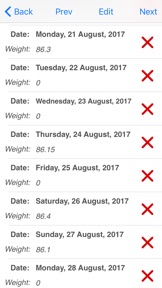
New in v1.5 Delete Weight. Just select the Weighs button and find the day you want to delete the weight of. Select the red cross on that row. Select 'Yes' when the dialog prompts you and the weight will be deleted.
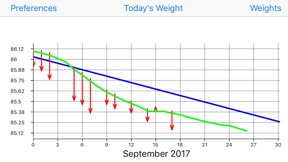
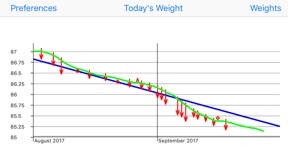
The blue line shows the required weight loss line. This line is calculated from the start date & weight and the end date & weight. If you follow this line you will reach your target weight.
The end of the arrow of each red line shows the weight for the day. The line extends to the rolling average weight for the day. If the arrow is downward then your weight is going in the right direction. If the arrow is upward then beware your weight is above the average.
The green line shows the rolling average weight. For each weight entered an average of the last ten days is calculated. This weight is plotted for each day and this is the green line. If the green line remains below the blue line you are winning.
Your daily weight can change too much over just a couple of days and this can be very discouraging when your weight increases.
You can easily see your new weight and how this affects the average on the graph.
Using this new information you can gain confidence that your weight is changing as required.
The graph also shows you the line of required weight loss to achieve your desired weight.
While your weights and the average weights remain below this line you are still on track.
Stray above this line and your are off course. The graph is a powerful visual clue to what is occurring.
Simple to use. Just start it. You just have to set the initial values in the Preferences and you are ready to go.
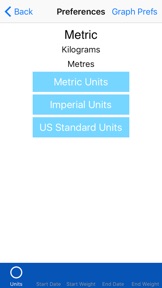
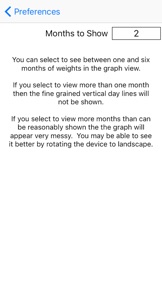
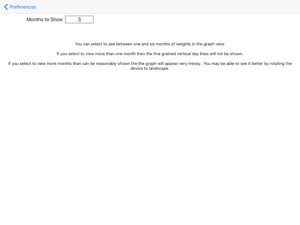
To set the Preferences you set the Start Date, Start Weight, End Date, End Weight and whether you want to use kilograms, stones & pounds, or pounds.
On the Graph page just select Today's Weight to add you weight for the day. Select Weight to add more than one weight for the month/months. Switch back to the Graph to see the weight(s) plotted. Once you have a few added the Graph View starts to make real sense.
The more weights you add the better the graph shows your progress.
Neue Funktionen von Version 1.8
UI updates for large screens, added rotation for iphones, colour scheme change.
Anbieter
Name
Jim Chapple
Informationen
Entwickler
Kategorien
Version
1.8
Größe
1 MB
Game Center
Nein
VPP Device Licensing
Ja
Bewertung
Altersfreigabe: 4+
Kompatibilität
iOS 8.0 oder neuer
Geräte
iPhone 11 Pro Max, iPad Air 2 (Cellular), iPad mini Retina (Cellular), iPad Pro (11"), iPad (5. Generation) Wi-Fi, iPad (6. Generation) Wi-Fi, iPod touch (6. Generation), iPad Pro (11") Wi-Fi + Cellular, iPad (6. Generation) Wi-Fi + Cellular, iPad Pro (12,9", 3. Generation), iPad (5. Generation) Wi-Fi + Cellular, iPad mini (5. Generation) Wi-Fi + Cellular, iPad mini (5. Generation), iPad Pro, iPad mini 3, iPad mini 4 (Cellular), iPad mini 4, iPhone 11, iPod touch (7. Generation), iPad mini 3 (Cellular), iPad Air, iPad Air 2, iPad Pro (12,9", 2. Generation), iPad Pro (Cellular), iPad Pro (9,7 Zoll) (Cellular), iPad Pro (10,5") Wi-Fi + Cellular, iPad Pro (9,7 Zoll), iPad mini Retina, iPad Air (Cellular), iPad Air (3. Generation) Wi-Fi + Cellular, iPhone 6 Plus, iPad Air (3. Generation), iPad Pro (10,5"), iPad Pro (12,9", 2. Generation) Wi-Fi + Cellular, iPhone 6, iPhone XR, iPhone XS, iPhone 6s, iPhone SE, iPhone 7 Plus, iPhone 6s Plus, iPhone 5s, iPhone X, iPhone 8, iPhone XS Max, iPhone 8 Plus, iPhone 7, iPhone 5, iPad (7. Generation) Wi-Fi, iPhone 5c, iPad (7. Generation) Wi-Fi + Cellular, iPhone 11 Pro, iPad Pro (12,9", 3. Generation) Wi-Fi + Cellular
Sprachen
Englisch
App Store: Kundenbewertungen
Bewertungen & Rezensionen
0,0 von 5 (Keine Bewertung)
App Store: Kundenrezensionen
Kein Eintrag