Wird aktualisiert

Design Space Studio for Cricut
Veröffentlicht: 2022-05-19
© 2021 Applux (Private) Limited


iPhone Screenshots




iPad Screenshots


Beschreibung
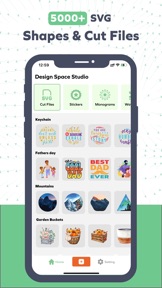
Design Space Studio gives you complete creative freedom over your next DIY project. Start from scratch or browse our Image Library for thousands of SVG Cut files, Monograms, Fonts, and Monogram Fonts. Use the Joy app to create fun or functional DIY Projects for your crafting needs. Design Space Studio also offers 1000+ watercolor stickers along with 200+ watercolor overlays.
You can even create watercolor logos for your next craft project using this app as this app, use this app as Design Space editor or Watercolor logomaker.
Features:
• More than 5,000 FREE images, fonts & projects
• More than 1000+ watercolor images
• More than 200+ watercolor overlays
• Upload & edit image files and monograms (.jpg, .bmp, .png, .gif, .svg, and .dxf)
• Browse more than 5000+ fonts or use Monogram Fonts
• Cut readymade SVG cut files to make projects quickly & easily
• Make cards, DIY projects, brochures, 3D designs & more
• Design home & party decor, DIY crafts, jewelry, and fashion accessories
• Acquire wonderful cut settings for your material type
• Imagine & draw artwork on scrap material
• Access images, monograms & projects on Design Space
• Setup & activate the machine easily from the Joy app
• Easily position, resize & rotate text and monograms with font kerning
• Step-by-step project guidelines
• DIY mug designs
• Auto-save projects
• Cut files, fonts, monogram fonts, and stickers are fully compatible with Design Space.
Easily Accessible
Browse the font and monogram fonts in the app or quickly search and filter to find the perfect fonts for your Design Space project.
Custom made Fonts
Don't know how to use Design Studio to import custom fonts? No problem! It provides step-by-step text and video instructions that show you how to do it. In a matter of minutes, you'll be cutting out customized fonts. Fonts are compatible with any Design maker that uses Design Space. For personal and commercial usage, all fonts are publicly licensed. Do you have more than one Design Space user in your home? You can share the fonts, monogram fonts, SVG cut files, and even sticker with them from this app.
Download Fonts for Design Space today and make your next project stand out with 1000+ SVG Cut files, Monogram fonts, and Stickers
Using the watercolor logo maker or overlay effect you can convert any shape or image into a watercolor based image, So download the Design Space Studio app today.
Get it today.
Please note that this app is not linked with the official Design Space app in any way.
Privacy Policy:
https://applux.info/privacy.html
Terms of Use:
https://applux.info/terms-of-use/
Informationen
Entwickler
Kategorien
Version
1.0
Größe
54 MB
Game Center
Nein
VPP Device Licensing
Ja
Bewertung
Altersfreigabe: 4+
Kompatibilität
iOS 14.0 oder neuer
Geräte
iPhone 5s, iPhone 6, iPhone 6 Plus, iPhone 6s, iPhone 6s Plus, iPhone SE, iPhone 7, iPhone 7 Plus, iPhone 8, iPhone 8 Plus, iPhone X, iPhone XR, iPhone XS, iPhone XS Max, iPhone 11, iPhone 11 Pro, iPhone 11 Pro Max, iPhone SE (2. Generation), iPhone 12, iPhone 12 Pro, iPhone 12 Pro Max, iPhone 12 mini, iPhone 13, iPhone 13 Pro, iPhone 13 Pro Max, iPhone 13 mini, iPhone SE (3. Generation), iPhone 14, iPhone 14 Plus, iPhone 14 Pro, iPhone 14 Pro Max, iPad (5. Generation) Wi-Fi, iPad (5. Generation) Wi-Fi + Cellular, iPad (6. Generation) Wi-Fi, iPad (6. Generation) Wi-Fi + Cellular, iPad Pro, iPad Pro (Cellular), iPad Pro (9,7 Zoll), iPad Pro (9,7 Zoll) (Cellular), iPad Pro (12,9", 2. Generation), iPad Pro (12,9", 2. Generation) Wi-Fi + Cellular, iPad Pro (10,5"), iPad Pro (10,5") Wi-Fi + Cellular, iPad Pro (11"), iPad Pro (11") Wi-Fi + Cellular, iPad Pro (12,9", 3. Generation), iPad Pro (12,9", 3. Generation) Wi-Fi + Cellular, iPad Air, iPad Air (Cellular), iPad Air 2, iPad Air 2 (Cellular), iPad Air (3. Generation), iPad Air (3. Generation) Wi-Fi + Cellular, iPad mini Retina, iPad mini Retina (Cellular), iPad mini 3, iPad mini 3 (Cellular), iPad mini 4, iPad mini 4 (Cellular), iPad mini (5. Generation), iPad mini (5. Generation) Wi-Fi + Cellular, iPad (7. Generation) Wi-Fi + Cellular, iPad Pro 11" (2. Generation), iPad Pro 11" (2. Generation) Wi-Fi + Cellular, iPad Pro 12,9" (4. Generation), iPad Pro 12,9" (4. Generation) Wi-Fi + Cellular, iPad Air (4. Generation) (Wi-Fi), iPad Air (4. Generation) (Wi-Fi + Cellular), iPad (8. Generation) Wi-Fi, iPad (8. Generation) Wi-Fi + Cellular, iPad Pro 11" (3. Generation), iPad Pro 11" (3. Generation) Wi-Fi + Cellular, iPad Pro 12,9" (5. Generation), iPad Pro 12,9" (5. Generation) Wi-Fi + Cellular, iPad (9. Generation), iPad (9. Generation) Wi-Fi + Cellular, iPad mini (6. Generation), iPad mini (6. Generation) Wi-Fi + Cellular, iPad Air (5. Generation), iPad Air (5. Generation) Wi-Fi + Cellular, iPad Pro11FourthGen, iPad Pro11FourthGenCellular, iPad ProSixthGen, iPad ProSixthGenCellular, iPad TenthGen, iPad TenthGenCellular, iPod touch (6. Generation), iPod touch (7. Generation), Mac Desktop
Sprachen
Englisch
App Store: Kundenbewertungen
Bewertungen & Rezensionen
0,0 von 5 (Keine Bewertung)
App Store: Kundenrezensionen
Kein Eintrag