Wird aktualisiert

Zoho TeamDrive
Veröffentlicht: 2018-08-06
© 2018, Zoho Corporation Pvt. Ltd. All Rights Reserved.


iPhone Screenshots


iPad Screenshots


Beschreibung
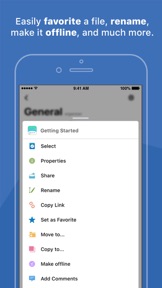
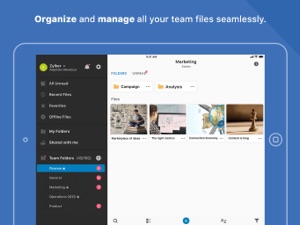
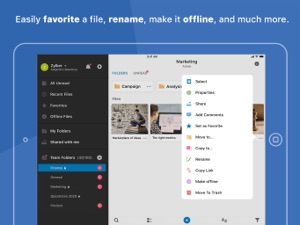
Zoho TeamDrive is a file sync, storage and content collaboration platform for modern teams and businesses. Zoho TeamDrive lets you organize and manage your organization/team files seamlessly.
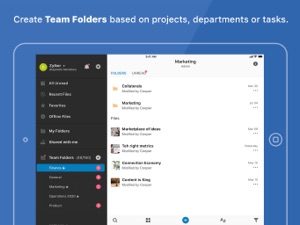
Files are organized and stored in dedicated Team Folders. Each Team Folder is created based on project, task, team, or department. Only permitted members will be able to read, write, or comment on the files. And all the members of a Team Folder will be notified of changes to any of the files in that folder.
A file in a team folder becomes visible to everyone only when it is marked as complete.
Here’s what you can do with the Team Drive app:
Create Team Folders
Team Folders are private workspaces which are used for specific projects or tasks or by dedicated teams or departments.
Add members to Team Folders
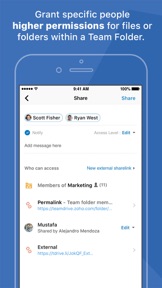
Start collaborating by adding coworkers to Team Folders. You can choose to provide read, comment or write access.
Set sub-folder permissions
You can choose which team member can access which sub-folder within a Team Folder. You can also choose to grant higher permission to specific team member within a Team Folder if required.
Create Public Team Folders
Anyone in the organization can discover and join public folders.
Contextual and global notifications
Team members will receive notifications every time a file/folder is shared then, when they're @mentioned or invited to a team folder, and also about public team folders that are relevant to them. Contextual notifications indicate changes made within a team folder.
Share externally
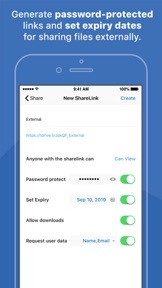
You can share files with those who are outside of the organization as well. Generate password-protected links and set expiry dates for sharing files externally.
If you have any questions or comments, please write to teamdrive@zohomobile.com. We'll be happy to help.
Neue Funktionen von Version 0.7
Bug fixes and performance enhancements.
Anbieter
Name
Zoho Corporation
Informationen
Entwickler
Kategorien
Version
0.7
Größe
138,2 MB
Game Center
Nein
VPP Device Licensing
Ja
Bewertung
Altersfreigabe: 4+
Kompatibilität
iOS 9.3 oder neuer
Geräte
iPhone 11 Pro Max, iPad Air 2 (Cellular), iPad mini Retina (Cellular), iPad Pro (11"), iPad (5. Generation) Wi-Fi, iPad (6. Generation) Wi-Fi, iPod touch (6. Generation), iPad Pro (11") Wi-Fi + Cellular, iPad (6. Generation) Wi-Fi + Cellular, iPad Pro (12,9", 3. Generation), iPad (5. Generation) Wi-Fi + Cellular, iPad mini (5. Generation) Wi-Fi + Cellular, iPad mini (5. Generation), iPad Pro, iPad mini 3, iPad mini 4 (Cellular), iPad mini 4, iPhone 11, iPod touch (7. Generation), iPad mini 3 (Cellular), iPad Air, iPad Air 2, iPad Pro (12,9", 2. Generation), iPad Pro (Cellular), iPad Pro (9,7 Zoll) (Cellular), iPad Pro (10,5") Wi-Fi + Cellular, iPad Pro (9,7 Zoll), iPad mini Retina, iPad Air (Cellular), iPad Air (3. Generation) Wi-Fi + Cellular, iPhone 6 Plus, iPad Air (3. Generation), iPad Pro (10,5"), iPad Pro (12,9", 2. Generation) Wi-Fi + Cellular, iPhone 6, iPhone XR, iPhone XS, iPhone 6s, iPhone SE, iPhone 7 Plus, iPhone 6s Plus, iPhone 5s, iPhone X, iPhone 8, iPhone XS Max, iPhone 8 Plus, iPhone 7, iPhone 5, iPad (7. Generation) Wi-Fi, iPhone 5c, iPad (7. Generation) Wi-Fi + Cellular, iPhone 11 Pro, iPad Pro (12,9", 3. Generation) Wi-Fi + Cellular
Sprachen
Englisch, Spanisch
App Store: Kundenbewertungen
Bewertungen & Rezensionen
0,0 von 5 (Keine Bewertung)
App Store: Kundenrezensionen
Kein Eintrag