InfoBedingungenDatenschutzKontakt
 
Wird aktualisiert
Scriptable

Scriptable

Veröffentlicht: 2018-09-21
© 2020 Simon B. Støvring
Scriptable - QR Code
Version 1.7.19
17+
Laden im App Store
Version 1.7.19
17+
Laden im App Store
Veröffentlicht: 2018-09-21
© 2020 Simon B. Støvring

iPhone Screenshots

Screenshot
Screenshot
Screenshot
Screenshot
Screenshot
Screenshot

iPad Screenshots

Screenshot
Screenshot
Screenshot
Screenshot
Screenshot
Screenshot

Beschreibung

Scriptable is an automation tool that enables you to write scripts that integrates with native features of iOS such as files, calendars, reminders, documents and much more.
An extensive support for widgets enables you to write your own widgets using JavaScript and run the scripts on your Home Screen. Your widgets can show any data and be customised to look just the way you want.
With Siri Shortcuts you can present images, tables and more in Siri as well as making Siri read out loud a text when you run a script from a Siri Shortcut.
There's a growing gallery of scripts to get you started with Scriptable.
Here’s a few examples of scripts you can create:
- Ask Siri whether a web service is down.
- Create a widget that shows data from your weather station.
- Postpone the next event in your calendar half an hour.
- Check what is currently on TV.
- Manage a list of movies you would like to watch.
- Upload files to an image optimizer and store a URL to the optimized image.
- Receive a notification with the weather report every morning.
- Create todos with prefilled data in your favorite todo app using URL schemes.
Features include:
- Write and run JavaScript.
- Auto complete of variable names, functions, keywords and properties as you type.
- Access lots of native iOS features from your JavaScript code, including managing files, calendars, reminders, contacts, photos, location, pasteboard, web views and more.
- Create your own widgets. Your scripts run on the Home Screen without needing to open the app.
- Siri Shortcuts enabling you to present images, tables, websites, HTML and more in Siri as well as making Siri read out loud a text.
- Support for input and output parameters in Siri Shortcuts.
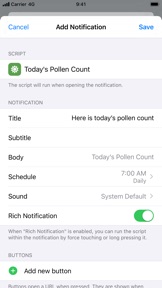
- Easily schedule rich notifications to run your scripts periodically.
- Work with files and directories from third party apps using File Bookmarks.
- Synchronise scripts to all of your devices using iCloud Drive.
- Scripts are stored as plain JavaScript files and can be browsed using the Files app.
- Assign one of over 800 glyphs and a color to a script to easily identify it in your directory of scripts.
- Run scripts directly on your Lock Screen and Home Screen using widgets.
- Run a script by 3D touching the app icon.
- Run a script from a share sheet and process the inputs.
- Schedule notifications and run a script directly from a notification.
- URL schemes enabling you to run scripts from other apps.
- Support for x-callback-url enabling advanced integration with other apps that support x-callback-url.
- Export and share scripts.
- Example scripts helping you get started creating your own scripts.
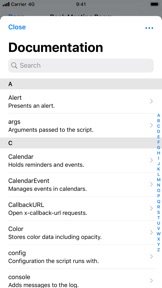
- Extensive documentation for all the native APIs you can use in your scripts. Available offline in the app and online on docs.scriptable.app.
- View the documentation in a separate window on iPad.
- Support for dark mode.
- Customise the editor to your liking.

Neue Funktionen von Version 1.7.19

Fixes an issue where background images were not shown in tintable widgets on iOS 18.

Anbieter

Name

Simon Stovring

Informationen

Kategorien

Version

1.7.19

Größe

28,9 MB

Game Center

Nein

VPP Device Licensing

Ja

Bewertung

Freigabe 17+ für Folgendes:
Unbeschränkter Zugang zum Web

Kompatibilität

iOS 15.5 oder neuer

Geräte

iPhone 5s, iPhone 6, iPhone 6 Plus, iPhone 6s, iPhone 6s Plus, iPhone SE, iPhone 7, iPhone 7 Plus, iPhone 8, iPhone 8 Plus, iPhone X, iPhone XR, iPhone XS, iPhone XS Max, iPhone 11, iPhone 11 Pro, iPhone 11 Pro Max, iPhone SE (2. Generation), iPhone 12, iPhone 12 Pro, iPhone 12 Pro Max, iPhone 12 mini, iPhone 13, iPhone 13 Pro, iPhone 13 Pro Max, iPhone 13 mini, iPhone SE (3. Generation), iPhone 14, iPhone 14 Plus, iPhone 14 Pro, iPhone 14 Pro Max, iPhone 15, iPhone 15 Plus, iPhone 15 Pro, iPhone 15 Pro Max, iPhone 16, iPhone 16 Plus, iPhone 16 Pro, iPhone 16 Pro Max, iPhone 16e, iPhone 17, iPhone 17 Pro, iPhone 17 Pro Max, iPhone Air, iPhone 17e, iPad (5. Generation) Wi-Fi, iPad (5. Generation) Wi-Fi + Cellular, iPad (6. Generation) Wi-Fi, iPad (6. Generation) Wi-Fi + Cellular, iPad Pro, iPad Pro (Cellular), iPad Pro (9,7 Zoll), iPad Pro (9,7 Zoll) (Cellular), iPad Pro (12,9", 2. Generation), iPad Pro (12,9", 2. Generation) Wi-Fi + Cellular, iPad Pro (10,5"), iPad Pro (10,5") Wi-Fi + Cellular, iPad Pro (11"), iPad Pro (11") Wi-Fi + Cellular, iPad Pro (12,9", 3. Generation), iPad Pro (12,9", 3. Generation) Wi-Fi + Cellular, iPad Air, iPad Air (Cellular), iPad Air 2, iPad Air 2 (Cellular), iPad Air (3. Generation), iPad Air (3. Generation) Wi-Fi + Cellular, iPad mini Retina, iPad mini Retina (Cellular), iPad mini 3, iPad mini 3 (Cellular), iPad mini 4, iPad mini 4 (Cellular), iPad mini (5. Generation), iPad mini (5. Generation) Wi-Fi + Cellular, iPad (7. Generation) Wi-Fi + Cellular, iPad Pro 11" (2. Generation), iPad Pro 11" (2. Generation) Wi-Fi + Cellular, iPad Pro 12,9" (4. Generation), iPad Pro 12,9" (4. Generation) Wi-Fi + Cellular, iPad Air (4. Generation) (Wi-Fi), iPad Air (4. Generation) (Wi-Fi + Cellular), iPad (8. Generation) Wi-Fi, iPad (8. Generation) Wi-Fi + Cellular, iPad Pro 11" (3. Generation), iPad Pro 11" (3. Generation) Wi-Fi + Cellular, iPad Pro 12,9" (5. Generation), iPad Pro 12,9" (5. Generation) Wi-Fi + Cellular, iPad (9. Generation), iPad (9. Generation) Wi-Fi + Cellular, iPad mini (6. Generation), iPad mini (6. Generation) Wi-Fi + Cellular, iPad Air (5. Generation), iPad Air (5. Generation) Wi-Fi + Cellular, iPad Pro 11" (4. Generation), iPad Pro 11" (4. Generation) Wi-Fi + Cellular, iPad Pro (12,9", 6. Generation), iPad Pro (12,9", 6. Generation) Wi-Fi + Cellular, iPad (10. Generation), iPad (10. Generation) Wi-Fi + Cellular, iPad Air (11″, M2, Wi-Fi), iPad Air (13″, M2, Wi-Fi), iPad Air (13″, M2, Wi-Fi + Cellular), iPad Pro (11″, M4, Wi-Fi), iPad Pro (11″, M4, Wi-Fi + Cellular), iPad Pro (13″, M4, Wi-Fi), iPad Pro (13″, M4, Wi-Fi + Cellular), iPad mini (A17 Pro) Wi-Fi, iPad mini (A17 Pro) Wi-Fi + Cellular, iPad (A16) Wi-Fi, iPad (A16) Wi-Fi + Cellular, iPad Air 11" (M3) Wi-Fi, iPad Air 11" (M3) Wi-Fi + Cellular, iPad Air 13" (M3) Wi-Fi, iPad Air 13" (M3) Wi-Fi + Cellular, iPad Pro (11″, M5, Wi-Fi), iPad Pro (11″, M5, Wi-Fi + Cellular), iPad Pro (13″, M5, Wi-Fi), iPad Pro (13″, M5, Wi-Fi + Cellular), iPad Air11M4, iPad Air11M4Cellular, iPad Air13M4, iPad Air13M4Cellular, iPod touch (6. Generation), iPod touch (7. Generation)

Sprachen

Deutsch, Arabisch, Chinesisch, Dänisch, Englisch, Finnisch, Hebräisch, Italienisch, Japanisch, Koreanisch, Malaiisch, Niederländisch, Norwegisch Bokmål, Portugiesisch, Russisch, Schwedisch, Spanisch, Thailändisch, Türkisch

App Store: Kundenbewertungen

Bewertungen & Rezensionen

4,6 von 5 (80 Bewertungen)

App Store: Kundenrezensionen

2026-01-31

Awesome

You can make and widgets what you want. Just awesome
Zotja
Version 1.7.19
2025-05-13

Love the App BUT

I really love to create my own widgets, but it’s extremely annoying to code on an iPhone/IPad. Pleas open the app up for Mac. I don’t even need the widget function, just the code environment.
Th-Luke
Version 1.7.7
2023-09-25

Searching works, replacing does not work!

Interessantes Programm! Interesting program! Der Programmierer hat sich viel Mühe gegeben. Vielen Dank für dieses großartige APP. Ideal um kleine JavaScript Aktionen auszuprobieren! Mehr Möglichkeiten als in Apple Kurzbefehle. _____ The programmer put a lot of effort into it. Thank you for this great APP. Ideal for trying out small JavaScript actions! More possibilities than in Apple shortcuts. … Suggestion for improvement: Searching works, replacing does not work!
>>Goodnight<<
Version 1.6.1
2021-09-30

Cool but….

This app is generally amazing but sadly all the scripts only work for the iPhone and not iPad. Hopefully developers will update their scripts to the iPad as well in the future :)
Ann_Linn
Version 1.5.3
2021-07-31

Cool!

So cool to simply fire up small javascript magic and restructure your 2000 contacts, clean up your calendar, etc, etc.
Love the app!
Feature request: I‘d like to see the possibility to change the settings for dual-sim phones. Eg. set certain contacts to only use one or the other mobile line.
Great App! Worth to support ;-)
Stefan Zechmeister
Version 1.6.9
2020-11-23

Perfect work!

Absolutely perfect app. I think this is one of my first reviews because usually I don‘t rate apps but this app earns 5 stars! Well done, thank you!
eppi1994
Version 1.4.9
2020-10-19

JavaScript for Automation

Scriptable is a great app to use for automation, especially in combination with the Shortcuts app.
Besides it has an extensive API on its own and can be used to master some of the shortcomings of the Shortcuts app.
Although the API offers a lot there could be some additional features to make it more useful. I really see forward to future updates and the goodies to be added next. Keep up the good work!
Happy Striker
Version 1.6.3
2020-03-28

Wow!

Wow Simon, I need to say thank you for this great app! You did a real good job! And in plus you offer it for free! You are a really nice guy! - You‘ll get tipped now ;)
I use scriptable for controlling my Shelly1 to open my garage door and to request the open/close state.
With your app it coasts me less then 3 hours!
And I‘m far away of pro developer!
Thank you!
trubadix