Wird aktualisiert



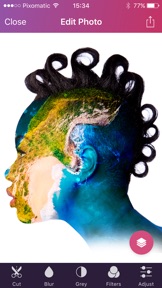
iPhone Screenshots




iPad Screenshots




Beschreibung
J.R. Bookwalter, Macworld: “Desktop-quality image masking and editing tools. For extracting objects from images and repurposing them in a variety of different ways, Pixomatic 3 has no equal on smartphones or tablets.”
With Pixomatic you can achieve anything you want. Create awesome photo compositions and edits, remove the background of your product photos, add a company logo or watermark, get professional CV or passport photos without going out for the photoshoot, create video thumbnails and much more. Your creative possibilities are limitless!
Pixomatic Pro Features:
- CUT Images: use the Cut tool to automatically create cutouts, save them for later use as stickers, or use the Inverse cutout mode. The Hair Tool refines your cutouts when dealing with fuzzy edges.
- ADJUST Photos: using numerous features, including, Brightness, Warmth, Contrast, Hue, Saturation, Tint, Exposure, Gamma, Highlights/Shadows & Vibrance. Get retro picture effect by adding some Grain and changing the Tone.
- OUTLINE: add an outline to the edges of your cutouts to make them stand out from the background even more! If you were thinking about launching your YouTube page or starting Product Photography, then this tool is definitely for you.
- Add FILTERS: brows our library of 100+ free filters, including vintage-style Polarize filters, Monochromes or creative Art filters.
- TEXT: over 50 fonts are available for every taste. Use them to add captions or create memes! Add a shadow to make the text more eye-catching and fun.
- LAYERS: add up to 20 layers, choose a layer by a single tap and change the order in seconds. Fill the background with a solid color (as in Product Photography) or use our integrated Pixabay stock to find the picture that you like.
- CROP: use the Round Crop tool or brows the popular sizes, where you can find cropping resolutions for iPhones or any of your preferred social networks.
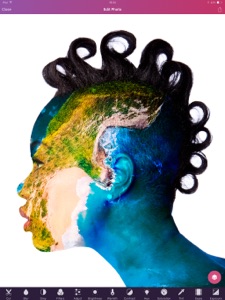
- Added functionality: Blend several modes, create an amazing Double Exposure, use different Blur options and much more!
Download the app to explore all of its features!
Follow our Facebook and Instagram accounts for tips, tutorials and inspiration.
Post your gorgeous edits on Instagram with #pixomatic. We’ll feature our favorites!
Contact us at support@pixomatic.us if you have any feature requests, questions, or comments.
"Pixomatic PRO" SUBSCRIPTION
You can subscribe for unlimited access to premium features and content offered for purchase within Pixomatic PRO.
Subscriptions are billed monthly at the rate selected depending on the subscription plan.
Subscriptions auto-renew at the cost of the chosen package, unless cancelled 24-hours in advance prior to the end of the current period. The subscription fee is charged to your iTunes account at confirmation of purchase. You may manage your subscription and turn off auto-renewal by going to your Account Settings after purchase. Per Apple policy, no cancellation of the current subscription is allowed during active subscription period. Once purchased, refunds will not be provided for any unused portion of the term. Any unused portion of a free trial period, if offered, will be forfeited when the user purchases a subscription to that publication, where applicable.
1-month subscription: USD$3.99 after 1 week free trial.
1-year subscription: USD$29.99 after 1 week free trial.
One-time purchase: USD$99.99.
Privacy Policy: www.pixomatic.us/privacy-policy
Terms of Use: www.pixomatic.us/terms-of-use
Get creative!
Follow our Facebook and Instagram accounts for tips and inspiration.
Post your gorgeous edits on Instagram with #pixomatic. We’ll feature our favorites!
Contact us at support@pixomatic.us if you have any feature requests, questions, or comments.
Neue Funktionen von Version 1.2.5
We have added 4 most popular fonts Youtubers use on their thumbnails, so now You can do too!
Check out our new tools: Outline and Line removal.
Now You can outline Your cutouts and even text. Check our Youtube channel for the detailed tutorial.
Have ugly power lines on your photos? Remove them with few taps.
We have added "Request Feature" for our PRO users, Go to settings and share what you would like to add or improve in Pixomatic PRO. Thanks for using Pixomatic PRO!
Informationen
Entwickler
Kategorien
Version
1.2.5
Größe
191,1 MB
Game Center
Nein
VPP Device Licensing
Ja
Bewertung
Altersfreigabe: 4+
Kompatibilität
iOS 9.0 oder neuer
Geräte
iPhone 11 Pro Max, iPad Air 2 (Cellular), iPad mini Retina (Cellular), iPad Pro (11"), iPad (5. Generation) Wi-Fi, iPad (6. Generation) Wi-Fi, iPod touch (6. Generation), iPad Pro (11") Wi-Fi + Cellular, iPad (6. Generation) Wi-Fi + Cellular, iPad Pro (12,9", 3. Generation), iPad (5. Generation) Wi-Fi + Cellular, iPad mini (5. Generation) Wi-Fi + Cellular, iPad mini (5. Generation), iPad Pro, iPad mini 3, iPad mini 4 (Cellular), iPad mini 4, iPhone 11, iPod touch (7. Generation), iPad mini 3 (Cellular), iPad Air, iPad Air 2, iPad Pro (12,9", 2. Generation), iPad Pro (Cellular), iPad Pro (9,7 Zoll) (Cellular), iPad Pro (10,5") Wi-Fi + Cellular, iPad Pro (9,7 Zoll), iPad mini Retina, iPad Air (Cellular), iPad Air (3. Generation) Wi-Fi + Cellular, iPhone 6 Plus, iPad Air (3. Generation), iPad Pro (10,5"), iPad Pro (12,9", 2. Generation) Wi-Fi + Cellular, iPhone 6, iPhone XR, iPhone XS, iPhone 6s, iPhone SE, iPhone 7 Plus, iPhone 6s Plus, iPhone 5s, iPhone X, iPhone 8, iPhone XS Max, iPhone 8 Plus, iPhone 7, iPhone 5, iPad (7. Generation) Wi-Fi, iPhone 5c, iPad (7. Generation) Wi-Fi + Cellular, iPhone 11 Pro, iPad Pro (12,9", 3. Generation) Wi-Fi + Cellular
Sprachen
Deutsch, Chinesisch, Englisch, Französisch, Italienisch, Japanisch, Koreanisch, Portugiesisch, Russisch, Spanisch, Türkisch
App Store: Kundenbewertungen
Bewertungen & Rezensionen
4,5 von 5 (19 Bewertungen)
App Store: Kundenrezensionen
Kein Eintrag