Wird aktualisiert


iPhone Screenshots

iPad Screenshots
Beschreibung
FilmLab makes it easy to view and digitize film negatives. All you need is your iPhone or iPad, and a light table or other back light. Whether you're an active film photographer who wants to share your latest roll of film on social media, or a family archivist with a box of old negatives to look through, I hope FilmLab will make your workflow easier and more fun.
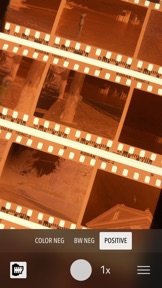
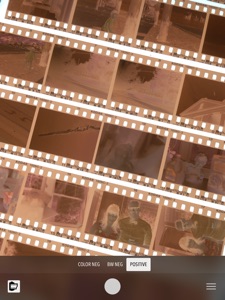
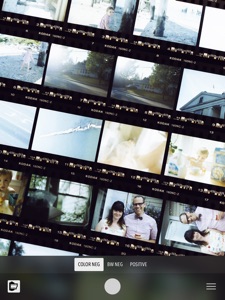
FilmLab's camera makes it easy to inspect negatives, with a live preview showing what they'll look like as positives. If you want to save or share an image, tap the capture button. FilmLab uses custom image processing to seamless combine multiple photos from your device's camera for maximum detail.
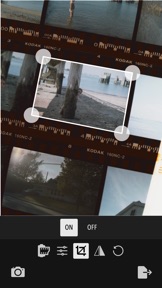
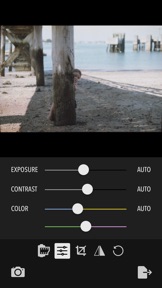
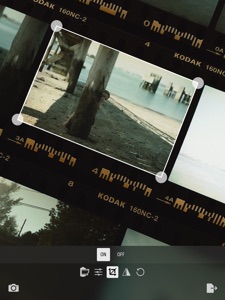
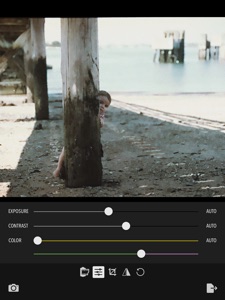
After capture, you can keep an entire proof sheet, or crop down to a single frame. FilmLab includes modes for color negative, black and white negative, and color positive. It also provides tools for rotating and flipping the image, and adjusting exposure and color balance. FilmLab's negative-to-positive conversion is much more than a simple inversion. It uses custom algorithms to emulate the chemical processes used in darkrooms, and produce accurate colors and tones.
Once you're happy with your proof sheet or image, you can save it to you Camera Roll, or share it using AirDrop, Messages, or social media apps.
Each film image is unique and special. That piece of film was in a specific place at a specific moment in time, and it captured the light as a permanent image using nothing but science and chemistry. Viewing these images always fills me with wonder and puts a smile on my face. I hope FilmLab gives you the same kind of feelings. Thanks for taking the time to check it out!
Neue Funktionen von Version 1.1
FilmLab 1.1 improves color rendering and image quality, fixes bugs, and adds a new feature: contrast control!
Color improvements: FilmLab's color negative mode is greatly improved. Colors are better balanced, more accurate, and have increased saturation. Tone curves have been fine-tuned to preserve highlight detail, and skin tones are warmer and more lifelike. Under the hood, FilmLab 1.1 now uses the wide-gamut Display P3 color space on supported devices. This makes it possible to pull more color information out of negatives, and produce a wider range of colors.
Image quality: FilmLab 1.1 fixes a bug which was causing output images to have color banding. It also has improved raw image processing, producing images with more detail and less noise.
Contrast control: FilmLab now lets you control contrast in both color and black and white images. This is especially helpful with black and white films, which vary in contrast depending on the film stock and development methods. Now you can reduce contrast to preserve details in a contrasty negative, or increase contrast to make a low-contrast negative pop.
Bug fixes: FilmLab 1.1 fixes bugs related to panning and zooming, especially with rotated images. It fixes a bug that made it impossible to fully zoom out on an image when a toolbar was covering part of it (which made it difficult to set crop points near the top and bottom edges). It fixes a bug in the camera which caused autoexposure to fail in certain conditions, resulting in clipped highlights or shadows. Finally, FilmLab 1.1 is better at automatically distinguishing between film and backlight when there is a small amount of film present in a scene.
Thanks to everyone who purchased FilmLab 1.0! And I especially want to thank those of you who took time to send email with questions and comments. Your feedback is helping make FilmLab better, and I hope you'll find version 1.1 to be a solid step forward.
Informationen
Entwickler
Kategorien
Version
1.1
Größe
15,5 MB
Game Center
Nein
VPP Device Licensing
Ja
Bewertung
Altersfreigabe: 4+
Kompatibilität
iOS 11.0 oder neuer
Geräte
iPad Pro (11"), iPad (5. Generation) Wi-Fi, iPad (6. Generation) Wi-Fi, iPod touch (6. Generation), iPad Pro (11") Wi-Fi + Cellular, iPad (6. Generation) Wi-Fi + Cellular, iPad Pro (12,9", 3. Generation), iPad (5. Generation) Wi-Fi + Cellular, iPad mini (5. Generation) Wi-Fi + Cellular, iPad mini (5. Generation), iPad Pro, iPad mini 3, iPad mini 4 (Cellular), iPad mini 4, iPad Pro (Cellular), iPad Pro (9,7 Zoll) (Cellular), iPad Pro (10,5") Wi-Fi + Cellular, iPad Pro (9,7 Zoll), iPad Air (3. Generation) Wi-Fi + Cellular, iPhone 6 Plus, iPad Air (3. Generation), iPad Pro (10,5"), iPad Pro (12,9", 2. Generation) Wi-Fi + Cellular, iPhone 6, iPhone XR, iPhone XS, iPhone 6s, iPhone SE, iPhone 7 Plus, iPhone 6s Plus, iPhone 5s, iPhone X, iPhone 8, iPhone XS Max, iPhone 8 Plus, iPhone 7, iPhone 5, iPad (7. Generation) Wi-Fi, iPhone 5c, iPad (7. Generation) Wi-Fi + Cellular, iPad Pro (12,9", 3. Generation) Wi-Fi + Cellular
Sprachen
Englisch
App Store: Kundenbewertungen
Bewertungen & Rezensionen
0,0 von 5 (Keine Bewertung)
App Store: Kundenrezensionen
Kein Eintrag