Wird aktualisiert


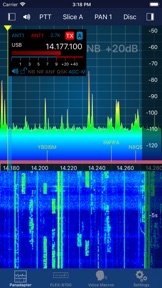
iPhone Screenshots

iPad Screenshots



Beschreibung
Official FlexRadio Systems® Client
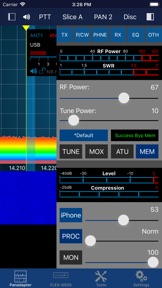
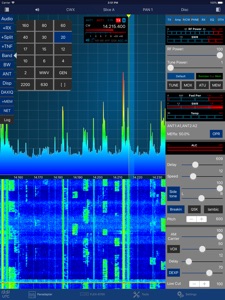
SmartSDR is a full featured radio client that enables your iPad or iPhone to operate your FlexRadio device.
Please note: This App requires a FlexRadio Systems® Series-6000 Software Defined Radio (SDR) Device.
However, the App also contains a FlexRadio Simulator (Demo Mode) so you can try this App even without owning a FlexRadio. PLEASE NOTE: The Demo Mode audio is by far not as good as when connecting the App to a real FlexRadio. That quality is identical to SmartSDR for Windows.
FACTS AND FEATURES:
SmartSDR offers almost all features of SmartSDR for Windows such as:
■ Creation, maintenance of Slices, TNFs, Filters
■ Unlimited number of Slices, Panadapters (limited only by radio model)
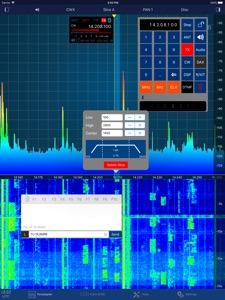
■ CWX support including Sidetone and live send mode
■ Maintain all Radio, Slice and Panadapter settings
■ Support for Memories
■ Profiles integration (TX, Microphone and Global)
■ Audio settings supported including equalizers
■ Support for TX Settings like Power including all Tuning features
■ Transverter support
■ SmartLink™ remote access
In addition to SmartSDR for Windows, this App offers these features:
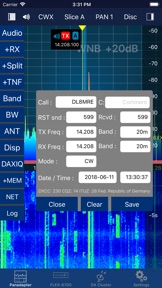
■ Band limits and Band maps and modes will be displayed inside the Pan adapter (In-App Purchase)
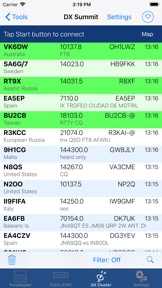
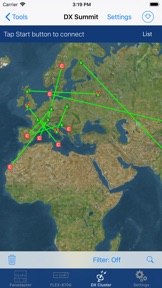
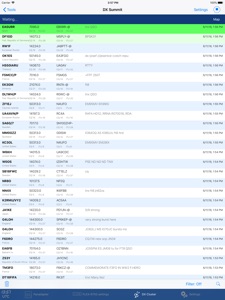
■ DX Cluster support which displays spots directly inside the Pan adapter (In-App Purchase)
■ Graphical tuning knob for easy and exact frequency selection.
■ Various additional minor bells and whistles such as easy TNF maintenance,
■ direct Bandwidth selection, Split Mode, instant Memory creation and more.
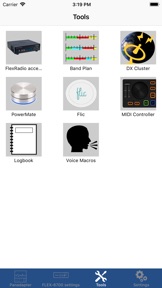
■ Device logging and device parameter monitoring (e.g. PA Temperature etc.)
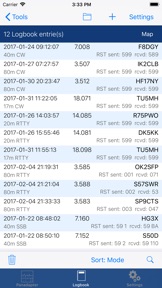
■ Logbook integration with ADIF Im- and Export (In-App Purchase)
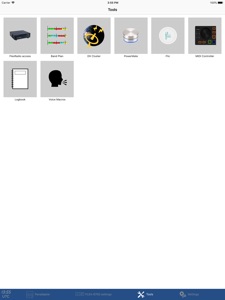
■ Support for two Bluetooth and USB Controllers (In-App Purchase)
■ Voice Macro recording and playback
There are just a few limitations compared to SmartSDR for Windows which are:
- Only one Panadapter visible at the same time.
- Diversity and full Duplex are not yet implemented.
WHAT YOU NEED:
- A FlexRadio Systems® FLEX-6000 series radio
- An Apple device such as an iPad, iPhone or iPod Touch which needs to run at least iOS 10
- A newer iPad (4, Air 2 or newer) or iPhone (5s or better) is recommended
To run this App at your home, nothing else but a regular WiFi connection is needed. You can immediately start using the App.
NETWORK REQUIREMENTS:
To run SmartSDR on your home network, nothing else is needed but a regular WiFi connection that can access your FLEX-6000. You can immediately start using the App.
For Remote operation via SmartLink™ a Version 2 License is required for your Radio.
The App supports Multitasking on the newer iPads so you can run SmartSDR in split mode parallel to your browser, Email software or any other App. It is also optimized for the new iPad Pro models.
SUPPORTED SDR HARDWARE:
FLEX-6300, FLEX-6400, FLEX-6400M, FLEX-6500, FLEX-6600, FLEX-6600M, FLEX-6700
Find out more here: http://go-to.me/smartsdr
Read the Manual: http://go-to.me/smartsdr-manual
Neue Funktionen von Version 2.6.2
This version includes the following changes and improvements:
■ Local Headsets Monitoring
Normally the MON button only works remotely (on the Radio). Now, local Headset Microphone input can also be monitored. You can turn on and adjust the monitor Volume from the Settings screen.
■ DX Cluster filters
Filters have been improved. It is now possible to filter not only by Band and Mode but also by Comment, CQ-Zone, ITU-Zone, Call Prefix and Country.
The Mode filter now also supports FT8, JT65, JT9 and WSPR.
■ Spot Details on Panadapter
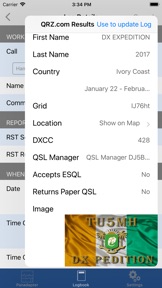
Now, you can double-tap on a Spot on the Panadapter to get Details about the Spot including QRZ/HamQTY lookup. Tapping once still adjusts the active Slice to the spot.
■ Support for the following languages: Spanish, French, Italian, Netherlands, Japanese, Chinese (Traditional and Simplified)
Please note, if you are not happy with a translation, just change back to English (in the Settings of the App) and/or contact me to help and improve the translations.
■ Listen only mode added
This mode allows, for example, to use Speakers or Headphones in Stereo mode if they don't support Stereo along with Microphone usage.
■ Band Zoom feature added
For this, two new buttons have been added under the left BT menu.
■ Possibility to use a hardware keyboard
If you have a hardware keyboard attached (Bluetooth or iPad Pro Keyboard) you can now press Space to toggle PTT, use the , or . keys to change the frequency or press Buttons 1 ... 9 to activate Voice Macros.
■ Several MIDI Controller fixes and improvements
The CMD-Micro and Hercules controllers are now working way better than before (TNX Doug!).
A new sensitivity setting has been added to reduce the Wheel sensitivity independent from the Step value.
■ Improvements for all Controllers (Midi,Flic,PowerMate)
Now, SplitMode, Band Zoom, Bandwidth, WNB as well as NB values and WNB values and even global Profiles can be selected.
■ Button to squeeze / expand the Voice Macro button bar and CWX Window
Now, you can squeeze the Macro button bar and CWX Window to save space.
■ Transverter "LO Error" now in MHz not Hz
■ CW Straight Key and Paddle improvements
Now, keying is no longer interrupted when moving the finger.
The CWX screen can now be moved further down to cover the TabBar so they can't be accidentally hit.
■ Fixes and improvements of the +/- Split function
The RX Slice remains Active slice after enabling Split mode.
The RX Slice becomes again TX Slice after disabling Split mode.
■ Some Slice Flag Changes
S-Meter is now Colored.
When transmitting, the S-Meter changes to Level meter on the TX Slice.
Thanks for your great support!
73,
Marcus, DL8MRE
Anbieter
Name
Marcus Roskosch
Informationen
Entwickler
Kategorien
Version
2.6.2
Größe
61,7 MB
Game Center
Nein
VPP Device Licensing
Ja
Bewertung
Freigabe 17+ für Folgendes:
Unbeschränkter Zugang zum Web
Kompatibilität
iOS 10.0 oder neuer
Geräte
iPad Air 2 (Cellular), iPad mini Retina (Cellular), iPad Pro (11"), iPad (5. Generation) Wi-Fi, iPad (6. Generation) Wi-Fi, iPod touch (6. Generation), iPad Pro (11") Wi-Fi + Cellular, iPad (6. Generation) Wi-Fi + Cellular, iPad Pro (12,9", 3. Generation), iPad (5. Generation) Wi-Fi + Cellular, iPad mini (5. Generation) Wi-Fi + Cellular, iPad mini (5. Generation), iPad Pro, iPad mini 3, iPad mini 4 (Cellular), iPad mini 4, iPad Air 2, iPad Pro (12,9", 2. Generation), iPad Pro (Cellular), iPad Pro (9,7 Zoll) (Cellular), iPad Pro (10,5") Wi-Fi + Cellular, iPad Pro (9,7 Zoll), iPad Air (3. Generation) Wi-Fi + Cellular, iPhone 6 Plus, iPad Air (3. Generation), iPad Pro (10,5"), iPad Pro (12,9", 2. Generation) Wi-Fi + Cellular, iPhone 6, iPhone XR, iPhone XS, iPhone 6s, iPhone SE, iPhone 7 Plus, iPhone 6s Plus, iPhone 5s, iPhone X, iPhone 8, iPhone XS Max, iPhone 8 Plus, iPhone 7, iPhone 5, iPad (7. Generation) Wi-Fi, iPhone 5c, iPad (7. Generation) Wi-Fi + Cellular, iPad Pro (12,9", 3. Generation) Wi-Fi + Cellular
Sprachen
Englisch
App Store: Kundenbewertungen
Bewertungen & Rezensionen
0,0 von 5 (Keine Bewertung)
App Store: Kundenrezensionen
Kein Eintrag